Metadata And Data Brokering Online Tool
Plug in your research data. Publish it FAIR.
Madbot connects the places your data already lives (a cluster, Galaxy, S3, OMERO) to the repositories that publish it. Describe it once with standard metadata, check it against ENA, Zenodo and Recherche Data Gouv requirements, and submit it in one click.
Animated example in four steps. 1: you tell madbot where your data is stored, and nothing is copied. 2: you describe it with metadata fields that are checked as you type. 3: madbot translates each field into the format of the repository you chose. 4: madbot fetches the files, checks them and submits them, and the repository returns an identifier. Three examples: sequencing reads from a cluster to ENA, RNA-seq counts from Galaxy to Zenodo, and microscopy images from S3 to Recherche Data Gouv.
madbot todaylive from the madbot API
How it works
Four steps from lab bench to repository
Link it, describe it, publish it, repeat it. Each step builds on the one before, so nothing gets typed twice.
01
Map your project, bring your team
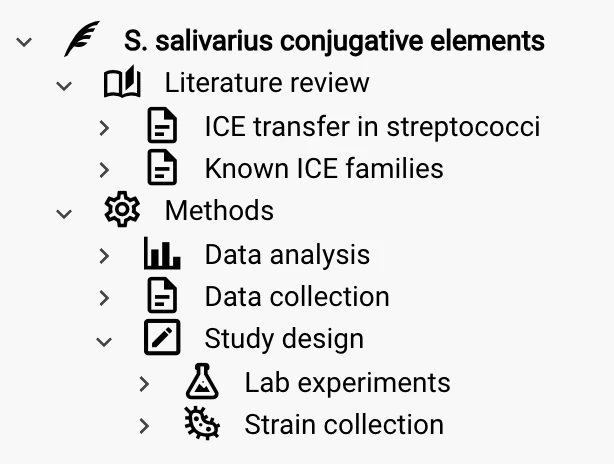
Shape your project as a tree that fits how you work: name each level and nest it as deep as you need, following the ISA model, your field’s conventions or simply your lab’s habits. Each node holds its own description, samples, datalinks and metadata. The project lives in your team’s workspace, a shared space where colleagues you invite build it with you.
02
Link data where it already lives
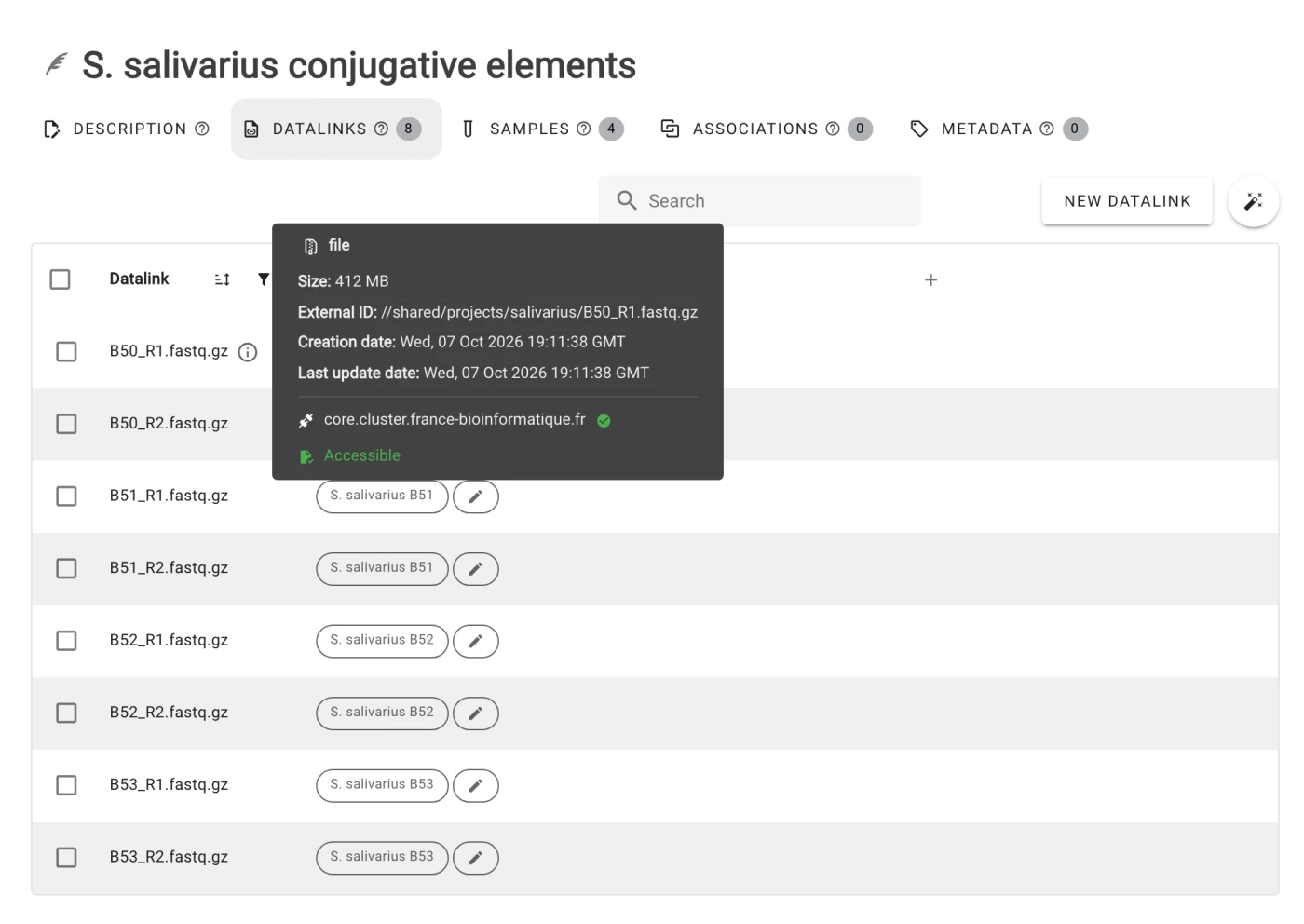
Point madbot at files on a cluster, a NAS, Galaxy, OMERO or an S3 bucket. Madbot doesn’t store your files: datalinks record exactly where each dataset sits and whether it is still accessible.
03
Describe once, inherit everywhere
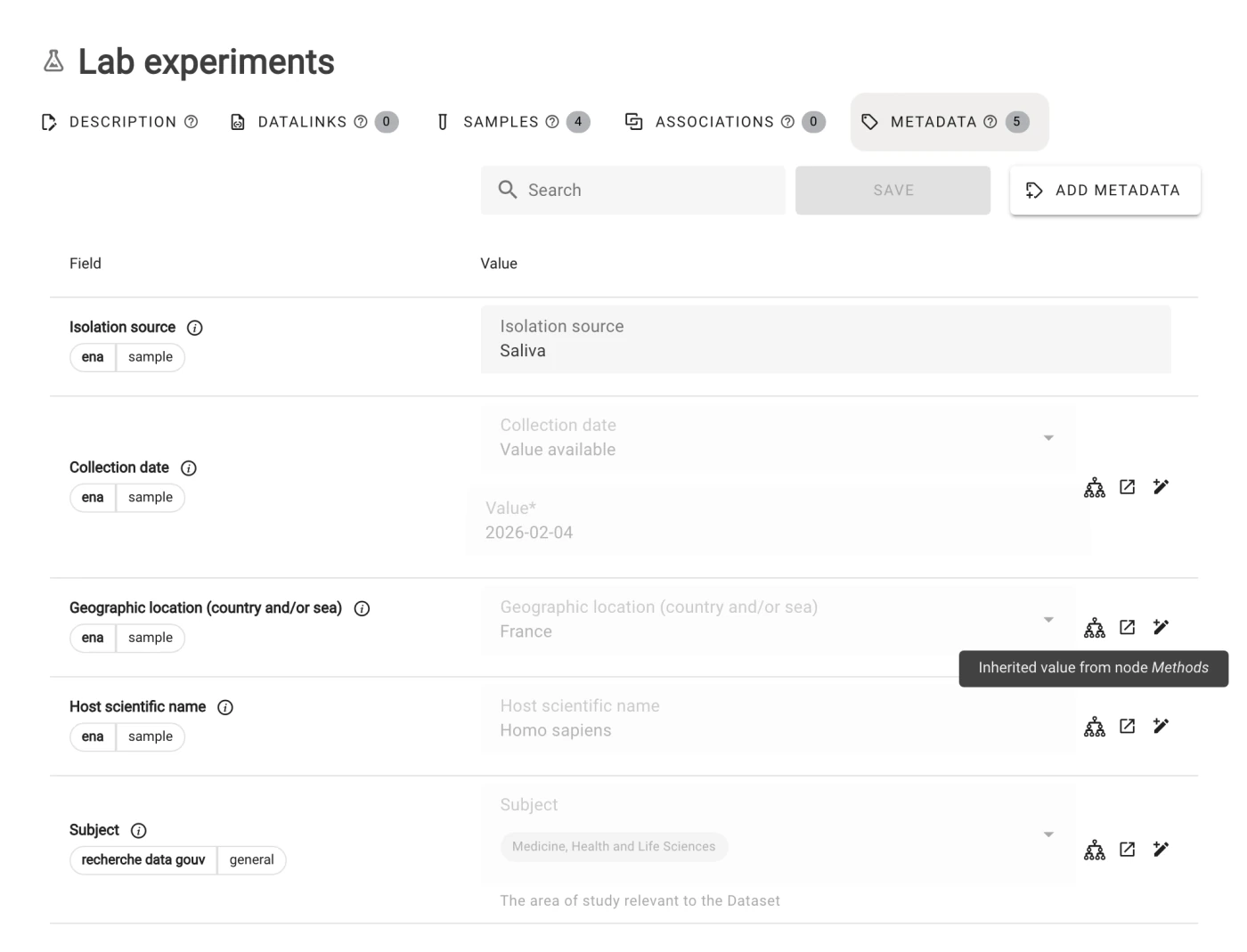
Describe your data with fields from madbot’s own referential or from community standards such as Dublin Core, Darwin Core or ENA checklists, all mapped to the repositories’ formats. A value set on a parent node flows down to its children, where you can still override it, and every entry is checked as you type.
04
Publish in one click
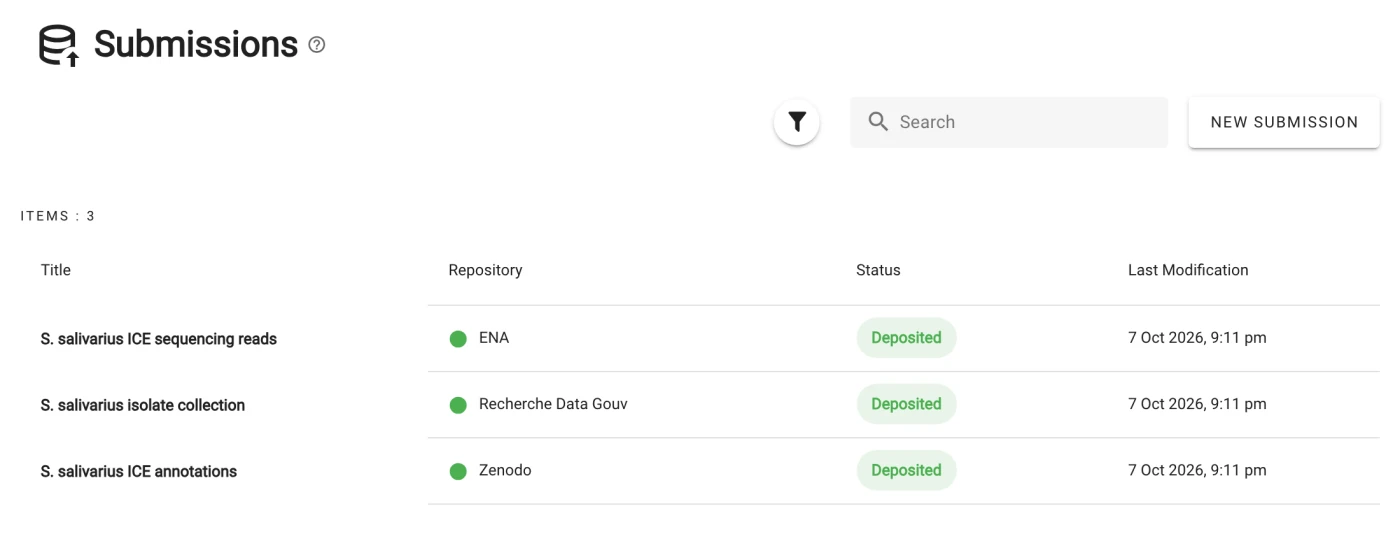
Choose the datalinks and the repository. Madbot fetches the files, maps your metadata to the repository’s format, validates it and submits it. The DOI or accession number comes back into madbot, linked to your data.
Across disciplines
Not just genomics
Madbot was born in bioinformatics, but its workflow isn’t tied to DNA. Plugins bring each field its own storage, standards and repositories; each route below works with today’s plugins.
Genomics
Sequencing runs
Paired-end reads described with ENA checklists and submitted as samples and runs.
 SSHFS
Metadata
ENA checklists
SSHFS
Metadata
ENA checklists
 Madbot assembles data and metadata into an ENA submission.
Published on
Madbot assembles data and metadata into an ENA submission.
Published on
 ENA
ENA
Bioimaging
Microscopy screens
Images stay in OMERO; madbot describes the experiment and publishes it.
 OMERO
Metadata
Dublin Core
Madbot translates Dublin Core to Recherche Data Gouv’s format, then assembles the deposit.
Published on
OMERO
Metadata
Dublin Core
Madbot translates Dublin Core to Recherche Data Gouv’s format, then assembles the deposit.
Published on
 Recherche Data Gouv
Omics analyses
Workflow outputs
Results from a Galaxy history, described once and published with a DOI.
 Galaxy
Metadata
madbot referential
Madbot translates its own fields to Zenodo’s format, then assembles the deposit.
Published on
Galaxy
Metadata
madbot referential
Madbot translates its own fields to Zenodo’s format, then assembles the deposit.
Published on
 Zenodo
Biodiversity
Occurrence data
Species observations described with Darwin Core terms, the standard of biodiversity data.
 S3
Metadata
Darwin Core
Madbot translates Darwin Core to Zenodo’s format, then assembles the deposit.
Published on
Zenodo
S3
Metadata
Darwin Core
Madbot translates Darwin Core to Zenodo’s format, then assembles the deposit.
Published on
Zenodo
Research software
Code and notebooks
A release from your repository, archived with its authors and license.
 GitLab
Metadata
Dublin Core
Madbot translates Dublin Core to Zenodo’s format, then assembles the deposit.
Published on
Zenodo
GitLab
Metadata
Dublin Core
Madbot translates Dublin Core to Zenodo’s format, then assembles the deposit.
Published on
Zenodo
Your field
Build it yourself
Occurrence data bound for GBIF? Microscopy images for the BioImage Archive? Each new route is a plugin, and the next ones are best built with the people who need them.
Plugins
Plugs into what you already use
Every connection is a small Python plugin. There are three kinds, and your institute can write its own.
Connect data from
Storage types you can create datalinks on.
 Preview
Describe with
Field sets that extend the metadata catalogue.

 Preview
Preview Still evolving: it works, and your feedback helps us stabilize it.community Built and maintained by partners outside the core team.
Workspaces
As open as possible, as closed as necessary
Each team gets its own workspace. Invite people, give them a role on each node, and keep sensitive data restricted while the rest stays open to collaborators.
For developers and institutions
Built to fit your infrastructure
Madbot is open source and designed to work with your own tools, not only through its interface.
API
A documented REST API
An OpenAPI 3 API, documented with Swagger, lets scripts and lab information systems (LIMS) work with madbot directly.
Plugins
Extend it in Python
The plugin API and its development guide let you add a connection without touching madbot’s core. Partners already maintain their own.
Security
Credentials in a vault
The credentials madbot uses to reach your storage are kept in HashiCorp Vault.
Quality
Checked on every change
Each change goes through automated linting, dependency and security scans, and tests before it is released.
License
Open source, BSD-3-Clause
The code is public on GitLab. Read it, reuse it, deploy it or contribute to it.
Archive
Preserved on Software Heritage
Madbot’s source code is archived by Software Heritage, the universal archive of software source code.
Developer documentation ↗ Source code on GitLab ↗ Software Heritage ↗
Roadmap 2026
What’s next for madbot
Q1
- Import metadata when creating a datalink
- Batch metadata editing
- Duplicate and move nodes
- Personal access tokens for the API
Q2
- SSH key authentication for SSHFS
- Recherche Data Gouv submission plugin
- Accession numbers and DOIs shown on submissions, data and metadata
- Suggested metadata values and sample–data associations
- Easier sample–data associations, with guidance for paired data
Q3
- Faster lists, project trees and metadata pages
- Plugin maturity shown in the app (Stable or Preview)
- A profile with ORCID and ROR identifiers
- Smoother editing: visible multi-selection, accurate unsaved-changes warnings, fixed rich-text editors
- Clear error messages when a plugin connection fails
Q4
- Batch editing everywhere, in one fast table view
- A faster application start-up
- Metadata entry: autosave, clearer validation, a single window to add fields
- Create datalinks and samples in bulk, with clear errors when something fails
- Typed data associations (paired, assembly…)
- A clearer interface: guided discovery of madbot’s vocabulary, separate user and workspace settings
- A documented API path for data-producing platforms
Want the details? Follow the epics on Taiga ↗
Team
Meet the people behind madbot
Developers and project leads at the Institut Français de Bioinformatique, in Paris and Strasbourg, dedicated to making your research experience better.

Thomas Denecker
Project owner
Paris
“This is awesome! Let’s try it!”

Julien Seiler
Project owner
Strasbourg
“It’s great but…”

Baptiste Rousseau
Full-stack developer
Paris
“I may have gone down a rabbit hole… but look what I found!”

Elora Vigo
Full-stack developer
Strasbourg
“Isn’t this a bit off-center?”
National working group
Shaped with institutes across France
Researchers, data-producing platforms and national infrastructures meet in madbot’s working group. Its members try madbot on their own use cases, tell us what to fix, and take it back to their communities.











Link your first dataset in minutes.
Madbot is free and open source, and runs on French public research infrastructure.
One email a month. Unsubscribe anytime.